.jpg)
Support is ending for Microsoft 10 Pro
What does it mean for your Grid Pad?
Microsoft will end all support for Windows 10 Pro after 14 October 2025. This means that devices on Windows 10 Pro will no longer receive security or feature updates after this date. If your Grid Pad is operating on Windows 10 Pro, read on to learn about your options and how Zyteq can help eligible devices upgrade to Windows 10 IoT to maintain security and performance.
What are your options?
You have three choices:
1. Upgrade to Windows 10 IoT – Supported by Microsoft until 13 January 2032.
Learn about Zyteq's upgrade process.
2. Submit a request for like-for-like replacement
You can apply through the NDIS to request a replacement device:
- Learn more - Assistive technology repairs, maintenance and replacement (NDIS)
- NDIS Fact sheet: Applying for a replacement support (PDF)
3. Remain on Windows 10 Pro – Continue using your device without further Microsoft security or features updates.
Why upgrade to Windows 10 IoT?
Upgrading ensures your device stays secure and supported until January 2032, preventing potential security risks once Windows 10 Pro is no longer supported by Microsoft from October 2025.
To ensure long-term security and performance, Zyteq began shipping Grid Pad devices with Windows 10 IoT from November 2023.
- Windows 10 Pro: support ends 14 October 2025
- Windows 10 IoT: support continues until 13 January 2032
Upgrading provides you with extended security and feature support, a stable operating system, and confidence that your Grid Pad will continue running securely into the future.
How Zyteq can support you
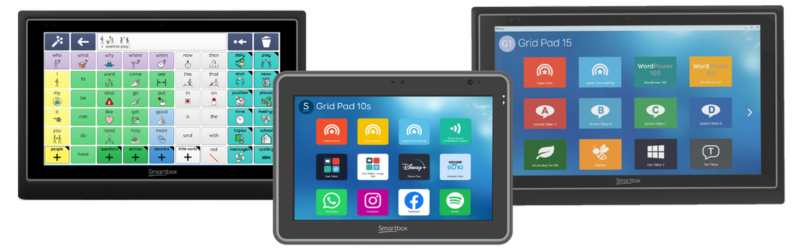
Zyteq is offering upgrade support for eligible Grid Pad devices shipped before November 2023 with Windows 10 Pro, including:
- Grid Pad 10s
- Grid Pad 12
- Grid Pad 15
These devices can be upgraded to Windows 10 IoT through our managed process.
What is Windows 10 IoT?
Windows 10 IoT is very similar to Windows 10 Pro, with one key difference: the Microsoft Store app is not installed by default. Apps can instead be downloaded via the Microsoft Web Store.
Your Grid software will continue to function exactly the same way, including all your existing grid sets.
Key feature comparison – Windows 10 Pro vs Windows IoT:
| Key Feature | Windows 10 Pro | Windows 10 IoT |
|---|---|---|
| Security updates | Until October 2025 | Until 13 January 2032 |
| Microsoft Store | Available | Web Store only |
| Windows 10 default apps * | Yes | No |
| Compatible with MS Office | Yes | Yes |
| Join a domain network | Yes | Yes |
| Security (anti-virus) | Windows Security | Windows Security |
| MDM Compatibility | Yes | Yes |
| Default browser | MS Edge | MS Edge |
| Feature updates | 22H2 | 21H2 |
| Grid software support | Yes | Yes |
* Windows 10 IoT does not include certain built-in apps as follows:
Calendar, Clock, Calculator, Camera, Cortana, Feedback Hub, Groove Music, Microsoft Store, Maps, Mixed Reality Portal, Mail, Paint 3D, People, Phone Link, Photos, Skype, Sticky Notes, Video Editor, Voice Recorder (list may vary from device to device)
The Zyteq Upgrade Process
To upgrade your eligible device:
1. Submit a request form. You will be required to include the following information:
- Device serial number (SN)
- Device user’s name
- Device model
- Return address
- Your contact details
2. Booking confirmation – Zyteq will confirm your booking.
3. Upgrade code – Your booking confirmation will include a six-digit code (UP0000…) for your reference.
4. Quote issued – Zyteq will provide you with a quote.
5. Accept the quote – If you choose to proceed.
6. Deliver your device – Drop it off in person or arrange delivery to:
Zyteq Pty Ltd
Level 3, 120 Bay St
Port Melbourne VIC 3207
7. Upgrade completed – Once finished, Zyteq will organise return delivery to you.
* Zyteq does not take responsibility for devices or equipment damaged or lost during transit.
What Happens if You Don’t Upgrade?
- Your device will no longer receive security updates, leaving it vulnerable to security threats.
- You may continue to use Grid offline, but you will need to go online to receive Grid updates.
FAQ's - Frequently Asked Questions
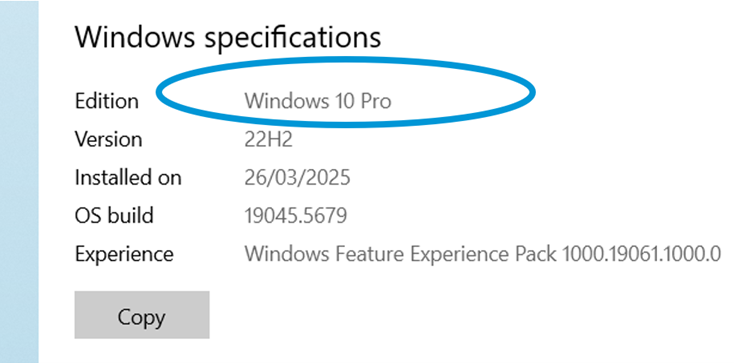
1. How do I know if my device is running Windows 10 Pro?
Check which operating system your device has, by selecting Windows Start > Settings > System > About. Your operating system will be shown under Windows Specification > Edition.
2. Can I keep using my Grid software on Windows 10 Pro?
Yes. Your Grid software and grid sets will continue to function normally. You will need to download any Grid updates.
3. Is there a cost for upgrading?
Yes. A quote will be provided after you submit your request form and you can then decide whether or not you would like to proceed.
4. How long does the upgrade process take?
Once Zyteq receives your device, the Windows 10 IoT upgrade typically takes up to 5 working days to complete, depending on device condition. After the upgrade is finished, your device will be returned to you. This is an estimate and may vary. You will be notified if any delays occur.
5. What if my device isn’t eligible?
If your device cannot be upgraded, you may consider a like-for-like replacement option.
6. Is there a deadline for requesting my Windows 10 IoT upgrade?
Yes, please fill in the repairs enquiry form to request the upgrade by 1st July 2026.
7. How do I book an upgrade?
You can request an upgrade by filling out our Upgrade Request Form.
8. Can I upgrade without sending my device to Zyteq?
No, currently the upgrade process requires us to install Windows 10 IoT on your device, so you’ll need to send it to our team.
9. Will I receive a loan or swap-out device during the upgrade?
No, we will not be providing a loan or swap-out device, unless you are having your device repaired for other reasons and are eligible for a swap-out.
10. Does the upgrade affect any installed programmes, software or files?
- Back up personal data and files and then restore them after the IoT upgrade.
- Re-install Grid after the upgrade with all your user information and grid sets saved.
- Other third-party apps will not be reinstalled; these can be installed by the user using the Web Store.
- Backup data is held for 90 days. If you do have third-party apps you can request access to this from our repairs team.
11. Does Zyteq support Microsoft’s Extended Security Updates (ESU) for Windows 10 Pro?
Microsoft offers an Extended Security Updates (ESU) programme, which allows users to receive critical and important security updates beyond the end-of-support date. The information about the limited one-year consumer program can be found here: Consumer ESU Program
There are 3 different options for this update but all require you (or the end user) to set up a Microsoft Account to manage the account details in the future. This is not something Zyteq can do on behalf of a user.
We are continuing to learn more about the option for ESU for individual devices. For more detailed information on the ESU program please visit Microsoft Learn.
Contact [email protected] if you have any queries or visit our website to learn about our latest devices.
Zyteq will support customers through the upgrade process where eligible but cannot be responsible for devices that remain on unsupported operating systems.
Information in this document is current as at 6 October 2025.