
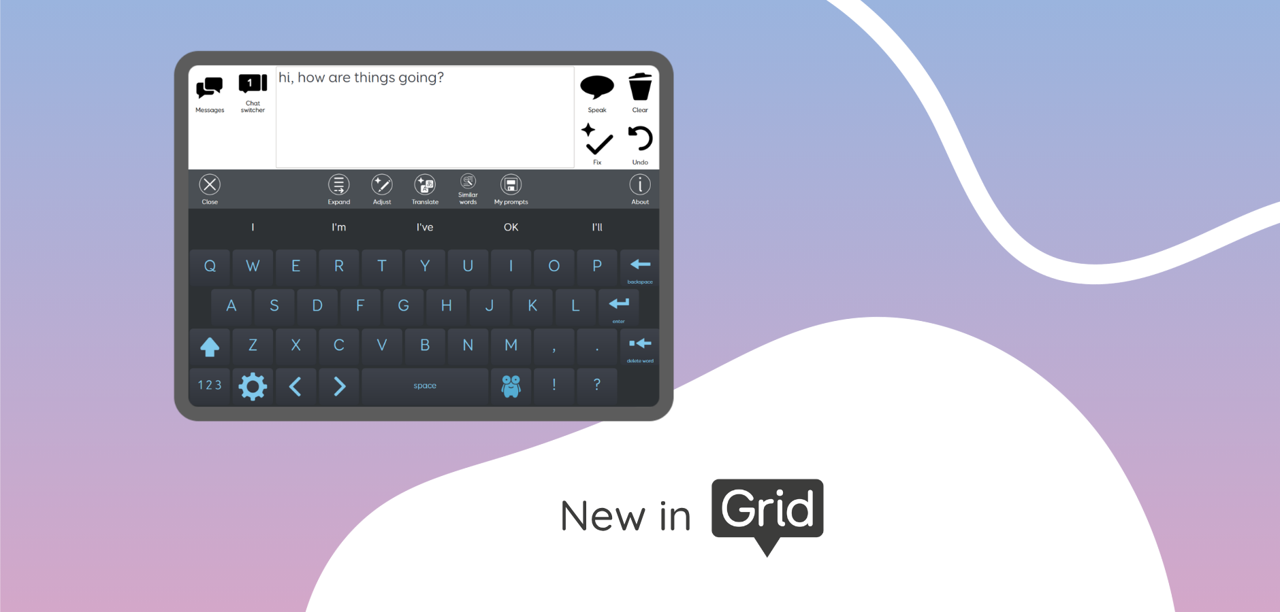
Text Talker AI beta grid set
Coming soon to Grid!
A new AI toolbar is now available in an AI version of Text Talker. Powered by the Smart Prompt Command, this grid set offers a versatile collection of AI tools that let you expand and refine text, translate sentences, discover synonyms, and craft your own custom prompts.
Available on Grid for iPad and Grid for Windows.
This is a beta grid set, and we’re keen to hear your feedback to better understand how these tools perform in real use and which features you find most valuable. The current version of Text Talker remains fully available without the AI toolbar.

How to try Text Talker AI beta
-
Make sure you are online and have the latest software update
- Opt in to the use of Online AI Tools in Settings – Data Control or within the onboarding page of the Text Talker grid set
- Go to Add grid sets – Text Communication
- Add the Text Talker AI beta grid set
 Expand
Expand keywords into a full message. You can then choose from four responses, or you can try again or ask AI to make the text in the writing area longer or shorter.
 Adjust
Take the message in your writing area, and adjust the emotion, tone, tense or style.
T ranslate
Use AI to translate your message into a number of languages. Use Edit mode to adjust the Smart Prompt commands to languages of your choice.
Similar words
Get suggested ‘Similar words’ for the last word in your writing area, then select one of the options to replace that word.
 My Prompts
Write your own prompts and save them to use later. You can use these as templates for your messages, or use your prompts to explore AI. Note that the Smart Prompt is not a chat-bot tool, and does not store history.
Powered by Smart Prompt
This new AI toolbar has been created using the Smart Prompt Command.
Designed to help you create custom AI-powered tools.